
How to Write a Blog Post That Ranks on Google (Step by Step)
I'm going to be brutally honest with you: most blog posts are invisible. I've been building websites and writing content for over 20 years, and I've watched hundreds of posts sink into oblivion without a single Google visitor. Not because the writing was bad, but because nobody taught the authors how to write for both humans and search engines at the same time.
Writing a blog post that ranks isn't about gaming the system or stuffing keywords everywhere. It's about understanding what someone is searching for, giving them the best possible answer, and structuring your content so Google can understand it. In this guide, I'll walk you through my exact process — the same one I use on this site and every client project I've touched in the last decade.
Why Most Blog Posts Never Get Traffic
Let me give you the uncomfortable truth: over 90% of all web pages get zero traffic from Google. Zero. I know because I wrote dozens of those invisible posts myself when I started blogging back in 2006. I'd spend hours crafting what I thought was an amazing article, hit publish, and then... crickets. For months. Forever.
The reason is almost always the same: the writer didn't start with what people are actually searching for. They picked a topic that interested them and hoped someone would stumble across it. That's like opening a restaurant in the desert and wondering why nobody shows up. On the internet, you need to start with keyword research — understanding what questions your audience is typing into Google, then writing the best answer on the entire internet.
Pro tip: The posts that rank aren't the longest or most beautifully written. They're the ones that most directly answer the searcher's question. If your post nails that intent, you're already ahead of 90% of the competition.
Before You Write a Single Word: Keyword Research
Every blog post that ranks starts the same way: with a keyword. Not a vague topic — an actual keyword that real people are typing into Google. I learned this the hard way after wasting months writing about topics nobody was searching for. I've written an entire guide on keyword research for beginners that walks you through the full process.
The short version: find a keyword with decent search volume, manageable competition, and clear intent. For a new blog, target long-tail keywords — phrases with 3-5 words that are more specific and less competitive. Instead of "WordPress hosting" (insanely competitive), target "best WordPress hosting for beginners" (much more achievable). Tools like Google's free Keyword Planner, Ubersuggest, or Google's autocomplete suggestions can give you plenty of ideas.
The key insight that changed everything for me: pick ONE primary keyword per post. Don't try to target five keywords in one post — that's a recipe for ranking for none of them.
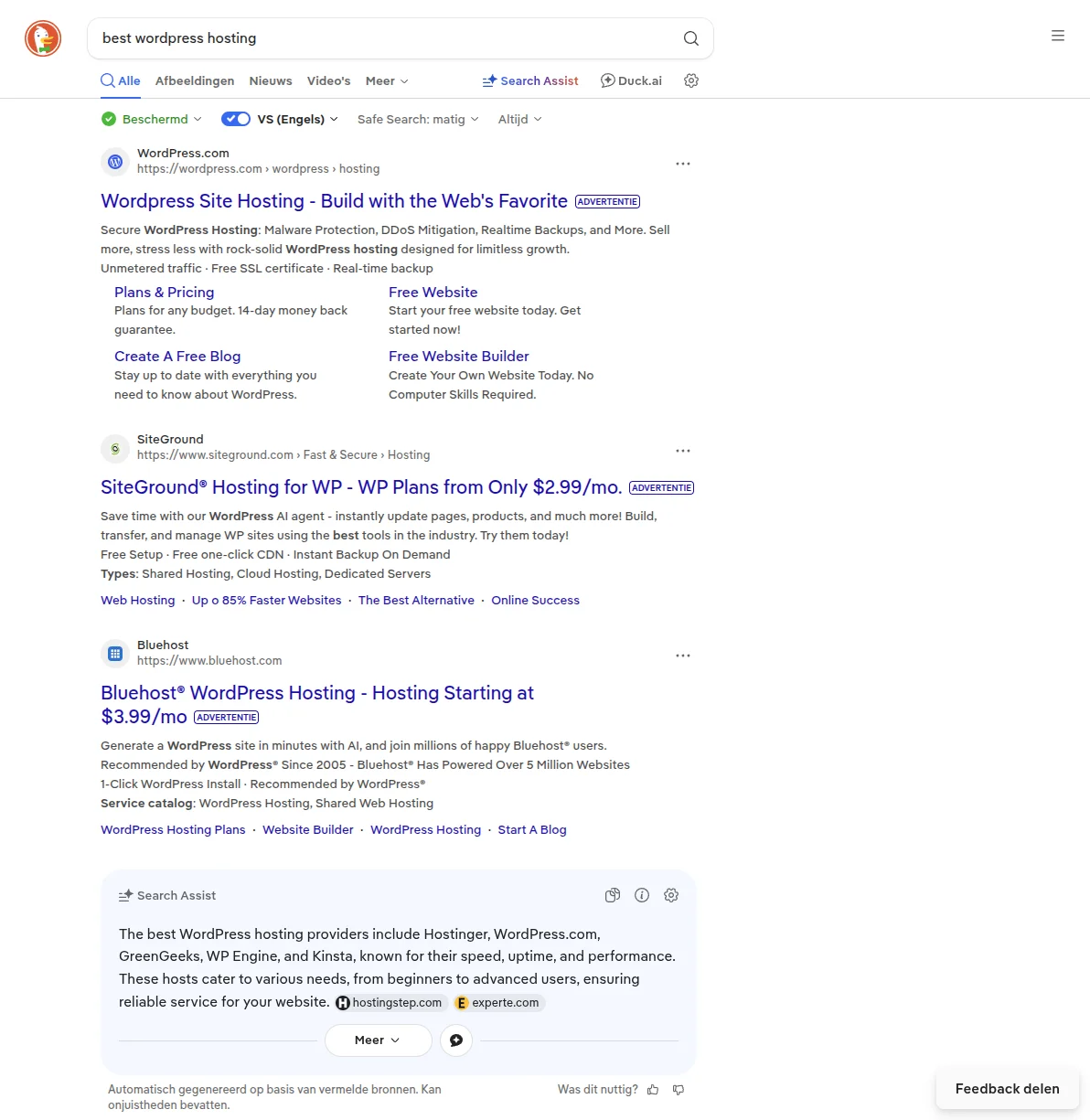
Look at that search results page. Every result on page one is there because it's doing something right — a compelling title, a clear meta description, structured content that answers the query. That's what we're aiming for. Your post needs to belong on that page.
The Blog Post Structure That Actually Ranks
Here's something most tutorials won't tell you: the structure of your blog post matters almost as much as the content itself. Google's algorithm is essentially trying to figure out whether your page is a good result for a given search query, and a well-structured post makes that job easy. I've tested this extensively over the years, and the posts that consistently rank follow a predictable pattern. Let me break it down piece by piece.
Start With a Killer Title
Your title is the single most important line in your entire post. It shows up in Google's search results, it determines whether someone clicks, and it tells Google what your post is about. Your primary keyword should appear in the title — ideally near the beginning — but make it compelling enough that a real person wants to click it.
I use a simple formula: [Keyword] + [Benefit or Specificity]. Instead of "WordPress Hosting," write "How to Choose WordPress Hosting That Won't Slow Down Your Site." Numbers work incredibly well too — "7 WordPress Hosting Mistakes That Kill Your Speed" outperforms "WordPress Hosting Mistakes" every time.
Hook Them in the First Two Sentences
You have about three seconds to convince someone to keep reading. That's it. If your opening line is generic filler like "WordPress is the most popular CMS in the world," you've already lost half your readers. Instead, start with something that speaks directly to the reader's problem or curiosity. I like to open with a personal story, a surprising statistic, or a bold claim. Something like: "I lost $3,000 in affiliate revenue because I chose the wrong hosting provider" is going to grab attention far more than a Wikipedia-style introduction.
Add a Table of Contents for Long Posts
Any post over 1,500 words should have a table of contents near the top. This isn't just good for readers (though it absolutely is — people love being able to jump to the section they care about). It's also great for SEO because Google sometimes uses your TOC links to create sitelinks in search results, which makes your listing bigger and more clickable. Most SEO plugins can generate a table of contents automatically, or you can use a dedicated plugin like Easy Table of Contents.
Use an H2/H3 Hierarchy That Matches Search Intent
Your heading structure is like a roadmap for both readers and Google. Use H2 tags for main sections and H3 tags for subsections within those. The trick is to structure your headings around what the searcher actually wants to know. If someone searches "how to speed up WordPress," your H2s should be things like "Install a Caching Plugin," "Optimize Your Images," "Choose Better Hosting" — not generic headers like "Step 1," "Step 2," "Step 3." Each heading should be informative enough that someone skimming the page can understand your main points without reading a single paragraph.
Keep Paragraphs Short — 2 to 3 Sentences Max
This was the hardest habit for me to break. I used to write long, academic-style paragraphs. But on the web, dense blocks of text are death. People scan, they don't read word-by-word. Short paragraphs create visual breathing room. Look at WPBeginner — their paragraphs are rarely longer than three sentences. Short paragraphs keep people on the page longer, which signals to Google that your content is valuable. It's a virtuous cycle.
Use Images Every 300 Words
A wall of text is intimidating, no matter how good the writing is. I aim to include a relevant image, screenshot, or graphic roughly every 300 words. For WordPress tutorials, that usually means annotated screenshots showing exactly where to click. For opinion pieces, it might be comparison tables, infographics, or relevant stock photos. Every image should have descriptive alt text (more on that in the SEO checklist below) — both for accessibility and because Google reads alt text to understand your images.
Include 3 to 5 Internal Links Per Post
Internal linking is one of the most underrated SEO strategies, and it's completely free. Every blog post should link to 3-5 other relevant posts on your site. This helps Google understand the relationship between your pages, distributes link authority throughout your site, and keeps readers engaged longer. When I write a post about choosing WordPress hosting, I naturally link to my SEO guide, my installation tutorial, and my caching plugins roundup. Each link adds context and value for both readers and search engines.
End With a Clear Conclusion and CTA
Don't just stop writing when you run out of things to say. Wrap up your post with a brief summary of the key takeaways and a clear call to action. Tell the reader what to do next — read a related article, download a resource, leave a comment, or try one specific tip from the post. A strong conclusion signals to both readers and Google that your content is complete and purposeful.
On-Page SEO Checklist for Every Post
Here's the checklist I run through before hitting publish on every single post. I still go through this list after hundreds of posts because it's that important.
Keyword placement:
- Title tag — Your primary keyword should appear in your post title, preferably near the beginning. This is the most important on-page SEO signal.
- First 100 words — Use your keyword naturally within the first paragraph. Don't force it, but make sure it appears early. Google pays extra attention to the opening of your content.
- URL (slug) — Keep your URL short and include the keyword.
/write-blog-post-that-ranks/is perfect./how-to-write-a-blog-post-that-will-rank-well-on-google-search-engine/is not. - At least one H2 heading — Include your keyword (or a close variation) in at least one of your H2 subheadings. This reinforces the topic for Google.
Meta description:
- Write a custom meta description of 150-160 characters that includes your keyword and compels people to click. Your SEO plugin (Rank Math or Yoast) will have a field for this. Don't leave it blank — Google will auto-generate one, and it's almost always worse than what you'd write yourself.
Images:
- Add descriptive alt text to every image. Don't just write "screenshot" — write "WordPress dashboard showing Yoast SEO meta description field." Alt text helps Google understand your images and is essential for accessibility. I've had images show up in Google Image search and drive meaningful traffic just because I wrote good alt text.
- Compress your images before uploading. A 5MB hero image will tank your page speed, which hurts your rankings. Use a plugin like ShortPixel or Imagify to compress automatically.
Linking:
- 3+ internal links — Link to at least three other relevant pages on your site. Link with descriptive anchor text (not "click here").
- 1-2 external links — Link to authoritative external sources when relevant. Linking out to high-quality sites signals to Google that you've done your research. I usually link to official WordPress documentation, industry studies, or tool homepages. Don't be afraid to link out — it helps your credibility, not hurts it.
Featured snippet optimization:
- Definition boxes — If your keyword is a "what is" query, include a clear 2-3 sentence definition early in the post. Google loves pulling these into featured snippets.
- Lists and tables — Use HTML lists for step-by-step instructions and tables for comparisons. Google frequently pulls these into featured snippets, giving you a massive visibility boost at the top of search results.
- Direct answers — For question-based keywords, start your answer with a direct, concise response before going into detail. This "summary first, detail second" approach is what Google is looking for.
Important: Don't treat this as a rigid formula. Hit the key placements — title, first paragraph, one H2, URL, meta description — and then write naturally. Google understands context, synonyms, and related terms. If your content genuinely covers the topic well, you'll include the right signals without forcing them.
Writing Tips That Actually Help SEO
Beyond the checklist, there's a craft to writing content that ranks. These lessons come from publishing hundreds of posts and tracking the results, not from reading SEO theory.
Answer the Question FAST
This is the single biggest lesson I've learned about SEO writing: give the answer first, then explain it. If someone searches "how much does WordPress cost," don't start with three paragraphs about the history of WordPress. Start with: "WordPress itself is free, but you'll need hosting ($3-30/month), a domain ($10-15/year), and potentially premium themes and plugins ($0-200)." Then go into the details.
I used to bury my main point six paragraphs deep. My rankings improved dramatically when I started front-loading the key information. Think of it like an inverted pyramid — most important information first, supporting details after. This also makes your content more likely to appear in featured snippets at the very top of Google's results.
Use Simple Language
Write at a grade 6-8 reading level. I'm serious. The best-performing content on the internet is written simply and clearly, not because readers are unintelligent, but because simple writing is easier to scan, easier to understand, and more enjoyable to read. Complex sentences with multiple clauses and jargon-heavy vocabulary might make you sound smart, but they make your bounce rate soar.
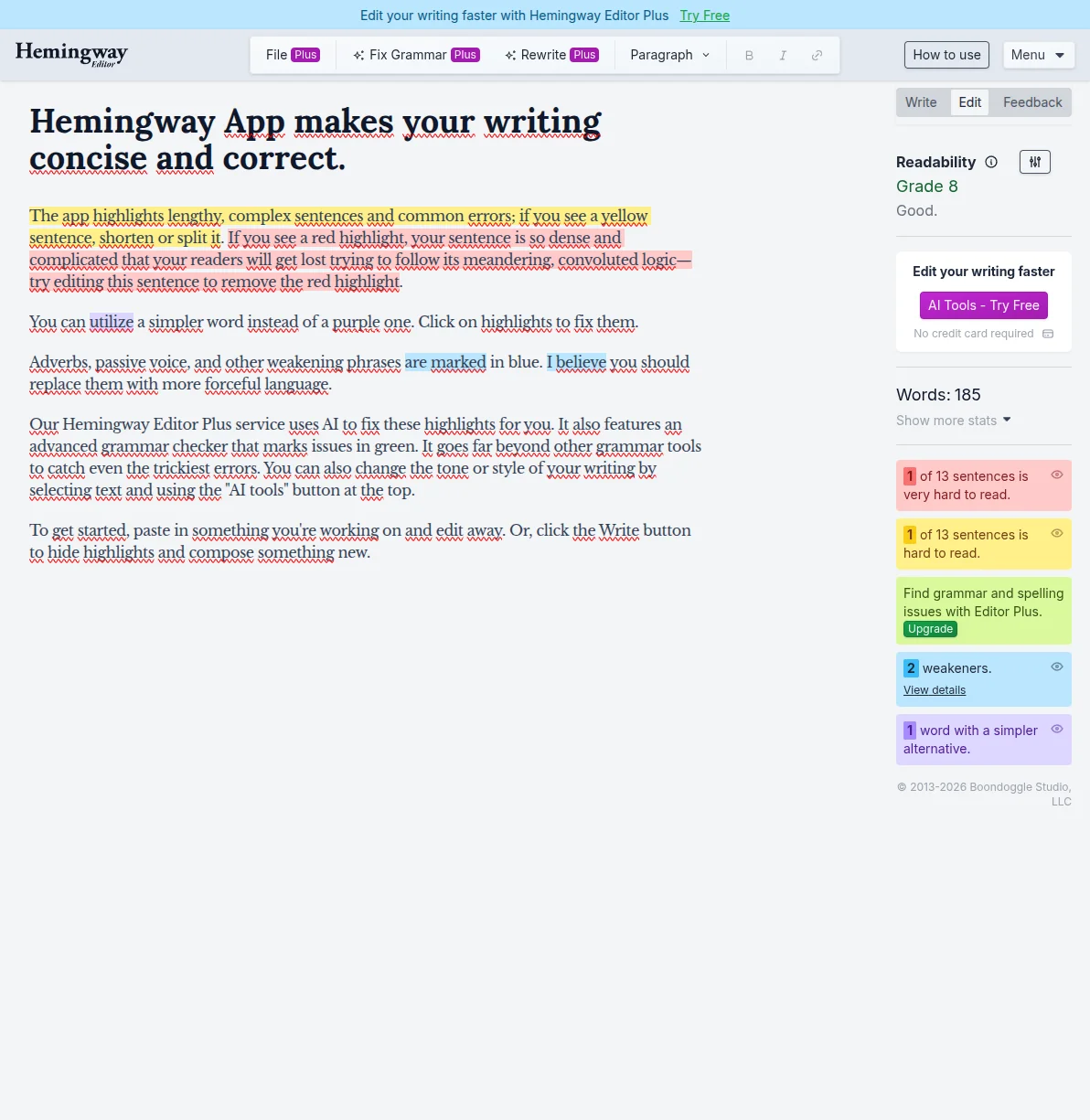
I use the Hemingway Editor (free at hemingwayapp.com) to check every article before publishing. It highlights complex sentences, passive voice, and unnecessarily difficult words. Aim for "Good" readability — that's roughly grade 6-8. You don't need to dumb anything down; you just need to express complex ideas in clear, direct language. Ernest Hemingway won the Nobel Prize writing short sentences. You can explain WordPress SEO without sounding like a textbook.
Write for Skimmers
Most people won't read your entire post — studies show visitors read about 20-28% of the words on a page. The smart play is to make your post scannable so even skimmers absorb your key points. Bold your key points so they jump out. Use bullet lists for steps and comparisons. Break up long sections with descriptive subheadings. Someone scrolling your post in 30 seconds should still understand your main argument.
Update Old Posts Quarterly
This is the "secret weapon" most bloggers ignore. Updating an existing post with authority is far more effective than writing a new one from scratch. Every quarter, I update my top-performing posts: add new information, refresh screenshots, update year references, and add internal links to newer content.
Pro tip: When you update a post, change the "last modified" date. Your SEO plugin should handle this automatically, but double-check. Google's search results often show dates, and a post from 2024 will get fewer clicks than one updated in 2026 — even if the content is identical. I've seen posts jump 10-20 positions just from a thorough update.
Real Example: Anatomy of a Post That Ranks
Let me walk you through a concrete example from this very site. My guide to choosing WordPress hosting is one of the most structured posts I've written, and it follows every principle in this article. Let me break down why it works.
The title — "How to Choose WordPress Hosting" — includes the exact keyword people search for. It's straightforward and promises practical advice. The opening paragraph immediately establishes credibility (my experience choosing hosting for dozens of projects) and empathy (acknowledging that the hosting landscape is confusing). There's no fluff introduction about what WordPress is — the reader already knows that.
The structure follows a logical progression: what to look for in hosting, the different types of hosting, specific recommendations, and common mistakes to avoid. Each section has a descriptive H2 heading that you could read as a standalone outline. The paragraphs are short — rarely more than three sentences. There's a comparison table that makes it easy to evaluate options at a glance. And throughout the post, there are internal links to related content: the WordPress installation guide, the cost breakdown article, and specific hosting reviews like my Hostinger review.
The FAQ section at the bottom targets long-tail question keywords that people actually ask — "Can I change my hosting later?" and "Is free hosting good enough?" These questions often show up in Google's "People Also Ask" boxes, which means they can drive additional traffic to the post. Each answer is detailed enough to be genuinely helpful, not a one-sentence cop-out. This is exactly the approach I recommend for every post you write: end with a FAQ section that anticipates the reader's follow-up questions.
Frequently Asked Questions
How long should a blog post be to rank on Google?
There's no magic word count. Posts that rank for competitive keywords tend to be 1,500-3,000 words, but the real answer is "as long as it needs to be to completely answer the search query." I've seen 1,200-word posts outrank 5,000-word posts because the shorter one answered the question more directly. Don't pad your content to hit a word count — Google recognizes filler.
How long does it take for a new blog post to rank?
For a brand new site, expect 3-6 months before you see meaningful organic traffic. For an established site, new posts can start ranking within 2-4 weeks. SEO is a long game — the key is publishing consistently while you wait. Check out my WordPress SEO guide for a complete strategy on building authority over time.
Should I focus on writing more posts or making existing posts better?
Both, but improving existing posts gives faster results. A post already ranking on page 2-3 just needs a push to reach page 1, while a new post has to build authority from scratch. My rule: 60% creating new posts, 40% updating existing ones. Use Google Search Console to find posts ranking in positions 8-20 and give them a thorough update.
Do I need an SEO plugin to write posts that rank?
Technically no, but practically yes. An SEO plugin like Rank Math or Yoast SEO gives you real-time feedback — telling you whether your keyword appears in the right places and flagging readability issues. It's like having an SEO expert looking over your shoulder. I use Rank Math on all my sites and recommend it for beginners and experienced users alike.
Is it better to write short, frequent posts or long, detailed posts?
Long, detailed posts — every time. I used to publish three short posts per week and got nowhere. Then I switched to one comprehensive post per week, and my traffic tripled within four months. One 2,500-word post that thoroughly covers a topic will outperform five 500-word posts on subtopics. Focus on quality over quantity.
Start Writing Posts That Actually Get Found
Writing blog posts that rank isn't rocket science, but it requires a deliberate process. Start with keyword research, structure your post for both readers and search engines, hit the on-page SEO basics, and write clearly. The biggest mistake beginners make is overthinking it. Pick a keyword, write the best answer on the internet, follow the checklist, and hit publish. Consistency plus quality is the formula, and after 20 years I can tell you there are no shortcuts that last.
If you're serious about ranking, make sure you've covered the fundamentals: read my complete WordPress SEO guide for the big-picture strategy, set up Google Analytics to track what's working, and install a solid SEO plugin to guide your optimization. Now go write something worth ranking for.

Written by Marvin
Our team tests and reviews WordPress products to help beginners make confident choices.
Learn more about our team →You might also like
WordPress SEO Checklist — 20 Steps to Rank Higher on Google in 2026
A concise, actionable WordPress SEO checklist covering setup, on-page optimization, technical SEO, and content strategy. Follow these 20 steps to give your WordPress site the best possible chance of ranking on Google.
postHow to Improve WordPress SEO: 15 Tips That Actually Work
Your WordPress site is live but traffic is flat. After 20 years of building and optimizing WordPress sites, here are the 15 things I do on every single project to get Google traffic flowing.
postLearn WordPress SEO — Your Complete Guide to Ranking on Google
A structured learning path to master WordPress SEO. From choosing the right plugin to writing content that ranks, follow these 6 steps to get your WordPress site on Google's first page.
postHow to Optimize WordPress for AI Search: GEO Guide for 2026
Learn how to optimize WordPress for AI search with GEO (Generative Engine Optimization). Real schema.org code, llms.txt setup, and tactics that get your site cited by ChatGPT and Perplexity.