
How to Start a Blog with WordPress (Complete 2026 Guide)
I started my first blog in 2006 on a free Blogger account. I had no idea what I was doing, no strategy, no audience — just a burning desire to share what I was learning about web development. That janky little blog taught me more about marketing, writing, and building an online presence than any course ever could. Fast forward to 2026, and blogging is still one of the most powerful ways to build authority, connect with an audience, and yes — make real money online.
If you're reading this, you're probably wondering whether starting a blog is still worth it. Let me give you the short answer: absolutely. There are now over 600 million blogs on the internet, and the global blogging market continues to grow year over year. More importantly, businesses and individuals who blog consistently generate 67% more leads than those who don't. But here's the thing — you need to do it right from the start. A blog built on a shaky foundation (wrong platform, bad hosting, no strategy) will struggle from day one. I've seen it happen hundreds of times.
In this guide, I'm going to walk you through my exact process for launching a WordPress blog — the same process I've refined over nearly 20 years and used to help countless beginners get their first site online. By the end of this article, you'll have a published blog with your first post live. Let's get into it.
7 Steps to Launch Your WordPress Blog
I've broken the entire process down into seven clear steps. Follow them in order and you'll have a fully functional blog in under an hour. I'm not exaggerating — modern WordPress hosting and tools have made this incredibly fast compared to when I started. Back then, I spent three days just trying to get WordPress installed on a shared server through FTP. You won't have that problem.
Step 1: Pick Your Niche
Before you buy a domain or sign up for hosting, you need to decide what your blog is going to be about. This might sound obvious, but I've watched so many beginners skip this step and launch a "general lifestyle" blog that covers everything from cooking to cryptocurrency. Those blogs almost never gain traction because they don't build authority in any one area. Google rewards expertise, and readers follow blogs that consistently deliver value in a specific domain.
The sweet spot is a niche that sits at the intersection of three things: something you're genuinely passionate about (you'll be writing about it for years), something other people are actively searching for (there needs to be demand), and something that's not so broad you'll be competing against massive publications. "Fitness" is too broad. "Fitness for busy parents over 40" is a niche. "WordPress" is competitive. "WordPress for small business owners" is achievable. When I launched this site, I chose WordPress tutorials specifically because I knew the space inside and out after 20 years, and there's always a fresh wave of beginners looking for clear, honest guidance.
Pro tip: Use Google Trends and Google's autocomplete suggestions to validate your niche before committing. Type your topic into Google and see what questions people are asking. If the autocomplete fills up with relevant queries, there's demand. If it's crickets, reconsider.
Step 2: Choose Your Hosting
Hosting is the foundation your entire blog sits on. Get this wrong and everything else suffers — your site loads slowly, crashes when you get traffic, and you'll spend hours dealing with technical problems instead of writing. I've tried over a dozen hosting providers over the years, from bargain-basement shared hosting to premium managed WordPress hosting, and the difference between a good host and a bad one is night and day.
For beginners, I recommend Hostinger because it offers the best balance of price, performance, and ease of use. Their WordPress plans start at just a few dollars per month, and they include a free domain name, free SSL certificate, one-click WordPress installation, and a custom dashboard that's genuinely beginner-friendly. I've set up several client sites on Hostinger and the performance has been consistently solid — pages load in under 2 seconds, which is exactly what Google wants to see.
If you want to dive deeper into what makes good hosting and compare your options, I've written a detailed guide on how to choose WordPress hosting that covers the key factors like speed, uptime, support, and scalability. On a tight budget? Check out my roundup of the best cheap WordPress hosting options — but be warned, not all budget hosting is created equal. Some of the ultra-cheap providers I tested had abysmal performance that would actively hurt your search rankings.
Important: Don't fall for the "free hosting" trap. Free hosting comes with ads on your site, severe limitations on storage and bandwidth, and zero support. You'll outgrow it in weeks and then face the headache of migrating everything. Invest the price of a coffee per month in proper hosting from day one. Your future self will thank you.
Step 3: Pick a Domain Name
Your domain name is your blog's address on the internet — it's what people type into their browser and what shows up in Google search results. Choosing a good domain is more important than most beginners realize, because changing it later is a massive headache that can tank your search rankings for months. I learned this the hard way when I rebranded one of my early projects and watched my organic traffic drop by 60% overnight.
Keep your domain short, memorable, and easy to spell. Avoid hyphens, numbers, and obscure domain extensions. A .com is still king for credibility, though .net and .org work fine too. If your desired .com is taken, get creative with your name rather than settling for a weird extension. I've put together a complete guide on how to choose a domain name with all my naming tips and the registrars I trust. Most hosting providers (including Hostinger) include a free domain for the first year, so you can handle this during the hosting signup.
Step 4: Install WordPress
Here's the beautiful thing about modern WordPress hosting: installation takes literally one click. Gone are the days of downloading ZIP files, setting up databases manually, and uploading files via FTP. When I started, WordPress installation was a genuine technical hurdle that scared off non-developers. Now? You click a button, wait 60 seconds, and your WordPress site is ready to go.
If you signed up with Hostinger (or pretty much any reputable hosting provider), WordPress installation is built right into the signup process. You'll be prompted to choose WordPress, enter your site name, and create admin credentials. That's it. If you want a more detailed walkthrough, my guide on how to install WordPress covers every method — one-click installers, manual installation, and even local development setups for the more technically inclined.
Pro tip: During installation, make sure you set a strong admin password and change the default username from "admin" to something unique. Brute-force attacks on WordPress sites are incredibly common, and "admin" is the first username hackers try. This one simple step prevents a surprising number of security issues down the road.
Step 5: Choose a Theme
Your WordPress theme controls how your blog looks — the layout, typography, colors, and overall design. The WordPress theme directory has thousands of free themes, and there are hundreds more premium options available from third-party developers. With so many choices, it's easy to spend days agonizing over the perfect theme. Don't. Pick a clean, fast, well-supported theme and move on to writing content. You can always change your theme later.
For blogs, I recommend either Astra or Kadence. Both are free, lightweight (they won't slow your site down), and highly customizable without requiring any coding knowledge. I cover these and other options in detail in my WordPress themes guide. Astra is the most popular WordPress theme in the world with over 1 million active installations, and for good reason — it just works. Kadence is newer but offers excellent design options and a built-in header/footer builder that's genuinely impressive for a free theme. My guide to the best free WordPress themes covers both of these in detail along with several other solid options.
Warning: Stay away from themes that promise "everything" — massive theme packages with 50 demo layouts, 200 custom widgets, and a kitchen sink. These bloated themes are the number one reason WordPress sites load slowly. They inject thousands of lines of CSS and JavaScript that your blog will never use. A lightweight theme with a page builder is always better than a theme that tries to do it all.
Step 6: Install Essential Plugins
Plugins extend what WordPress can do, and there are a handful that every blog needs from day one. I'm talking about security, SEO, caching, and backup plugins — the boring-but-critical stuff that protects your site and helps it perform well in search engines. Skip these and you're building your blog on sand.
At minimum, install these right away: an SEO plugin like Rank Math or Yoast SEO (I use Rank Math on all my sites — it's free and more feature-rich than Yoast's free tier), a caching plugin like WP Super Cache or LiteSpeed Cache (if your host uses LiteSpeed servers, which Hostinger does), and a security plugin like Wordfence or Sucuri. You'll also want a backup solution — UpdraftPlus is the gold standard for free backups.
I've written an exhaustive guide on the must-have plugins for a new WordPress site that covers everything you need with specific recommendations and configuration tips. Don't go overboard with plugins though — every plugin you install adds code that needs to load on every page view. I've seen sites with 40+ plugins that took 8 seconds to load. Aim for 10-15 essential plugins maximum.
Step 7: Write Your First Blog Post
This is the moment everything you've built so far comes together. You've got hosting, a domain, WordPress installed, a clean theme, and essential plugins configured. Now it's time to actually write something. And I'll be honest — this is where most people freeze. They stare at a blank screen, wondering what to write about, worrying it won't be good enough, and paralyzing themselves with perfectionism. Don't let that happen to you. Your first post doesn't need to be a masterpiece. It needs to exist.
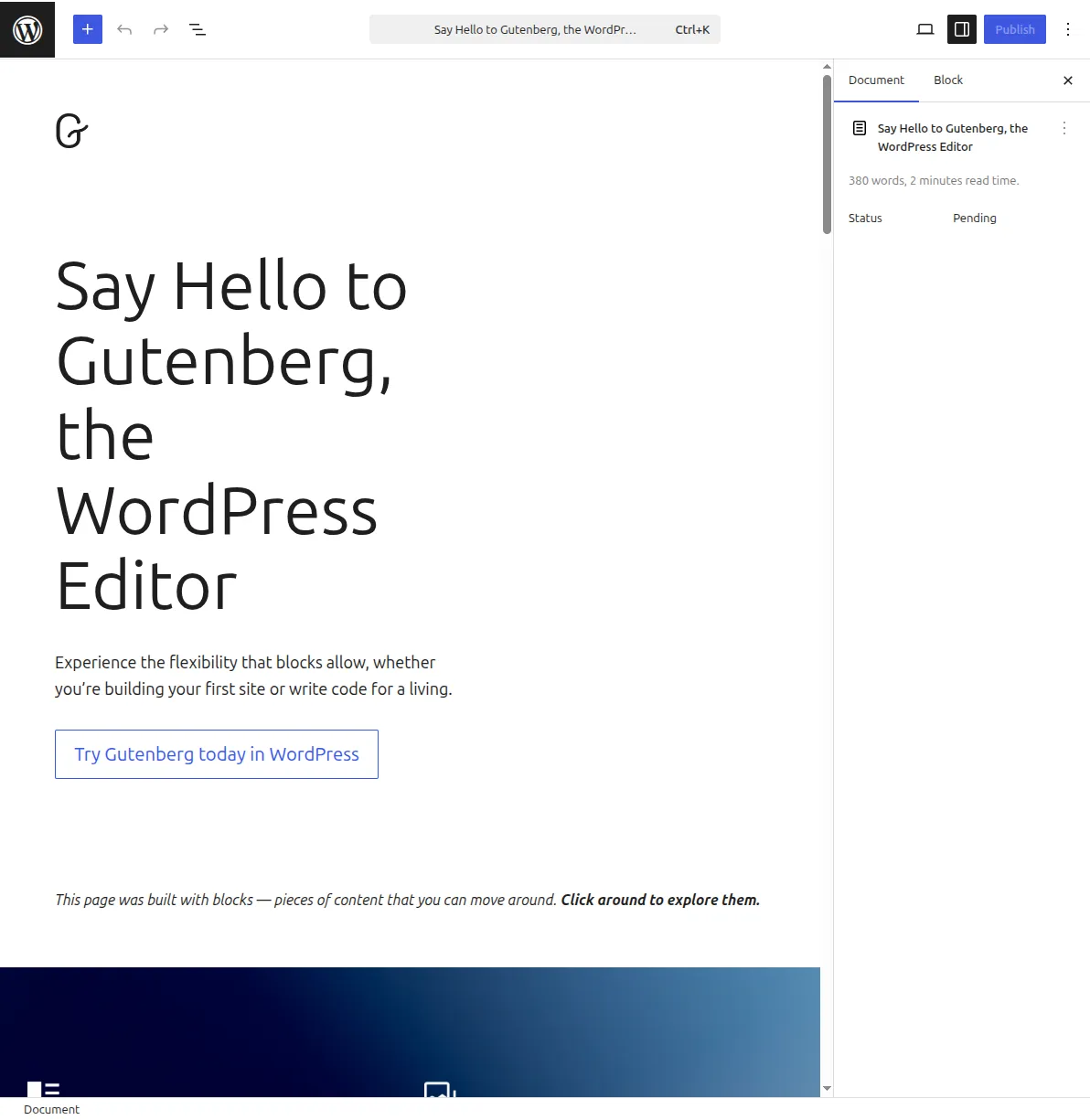
WordPress uses the Gutenberg block editor, which makes writing and formatting posts incredibly intuitive. Each piece of content — a paragraph, heading, image, list, or quote — is a separate "block" that you can add, rearrange, and customize independently. To create your first post, go to Posts > Add New in your WordPress dashboard. You'll see a clean editor with a title field at the top and a content area below. Start by typing your post title, then click into the content area and start writing.
Here's a structure that works well for your first blog post: write a compelling title that includes your main keyword, add an introduction that hooks the reader (1-2 paragraphs), break the body into sections with H2 and H3 headings, include at least one image (you can upload images directly by clicking the + button and selecting the Image block), and wrap up with a conclusion that tells readers what to do next. Keep paragraphs short — 2-3 sentences maximum. When you're done, click the blue Publish button in the top right corner. Congratulations, you're officially a blogger.
Pro tip: Before hitting publish, fill in the SEO fields provided by your SEO plugin (Rank Math or Yoast). Write a custom meta description of 150-160 characters, make sure your URL slug is clean and includes your keyword, and add alt text to all your images. These small steps make a genuine difference in how quickly Google picks up and ranks your content.
How to Get Your First 1,000 Visitors
Publishing your first post is a milestone, but a blog with zero readers isn't much of a blog. Getting your first 1,000 visitors is the hardest part of blogging — after that, momentum starts to build and growth becomes more predictable. Here's exactly how I approach traffic generation for new blogs, based on what's worked consistently over nearly two decades.
SEO is your long-term engine. Search engine optimization is how you get free, consistent traffic from Google without paying for ads. The fundamentals are straightforward: research keywords people are actually searching for, write the best answer on the internet for those keywords, and make sure your on-page SEO is solid (title tags, meta descriptions, headings, internal links). I've put together a comprehensive WordPress SEO checklist that walks you through every optimization step. SEO takes time — expect 3-6 months before you see significant organic traffic on a new blog — but it's the foundation everything else builds on.
Social media gives you immediate reach. While you're waiting for SEO to kick in, share every new post on relevant social media platforms. Don't just drop a link — write a compelling summary or pull out the most interesting point from your article. For most blog niches, Pinterest, Twitter/X, and LinkedIn drive the most traffic. Facebook groups related to your niche can also be goldmines if you contribute genuinely rather than just self-promoting. I once got 2,000 visitors in a single day from a well-timed Reddit post in a niche subreddit. The key is providing value first and including your blog link naturally.
Guest posting builds authority fast. Reach out to established blogs in your niche and offer to write a high-quality guest post. You'll get exposure to their audience, a backlink to your site (which helps SEO enormously), and credibility by association. When I was building one of my earlier blogs, three strategic guest posts on well-known sites in my niche tripled my organic traffic within two months because of the backlink authority those posts passed to my domain.
Consistency is non-negotiable. Publish at least one new post per week — ideally two. Google rewards sites that demonstrate consistent publishing activity, and readers subscribe to blogs that they know will have fresh content. I've seen too many bloggers publish five posts in the first week and then disappear for three months. That pattern kills blogs. Set a realistic publishing schedule and stick to it religiously. Even one quality post per week compounds into 52 posts by the end of the year, and that's more than enough to build a substantial content library.
How Blogs Make Money
Let's talk about the part everyone's curious about: money. Can you actually make a living from blogging? The honest answer is yes — but probably not as quickly as the "how I made $10K my first month" YouTube gurus want you to believe. Most of those stories involve either outright lies, extremely unusual circumstances, or years of prior audience-building that they conveniently leave out. Here's what's realistic and how the money actually flows.
Affiliate marketing is the most accessible monetization method for new bloggers, and it's how many successful blogs (including this one) generate the bulk of their income. When you recommend a product or service and include a special tracking link, you earn a commission if someone clicks that link and makes a purchase. The key is recommending products you genuinely use and believe in — readers can smell a disingenuous recommendation from a mile away. Hosting affiliate programs (like Hostinger, Bluehost, and SiteGround) pay particularly well, typically $50-200 per signup. Amazon Associates is another easy starting point, though commissions are lower (1-10% depending on the category). For the specific WordPress plugins that help you manage affiliate links, run ads, and accept payments, see my best monetization plugins guide.
Display advertising through networks like Google AdSense, Mediavine, or AdThrive puts ads on your blog and pays you based on impressions and clicks. AdSense is the easiest to get into — there's no minimum traffic requirement — but the payouts are modest until you're getting serious page views. Most bloggers earn $2-10 per 1,000 page views with AdSense. The premium ad networks like Mediavine (requires 50,000 monthly sessions) and AdThrive (requires 100,000 monthly page views) pay significantly more — typically $15-30 per 1,000 page views. Getting into these networks is a realistic goal once your blog has 6-12 months of consistent content and traffic growth.
Sponsored posts become an option once you've built a visible audience. Brands pay you to write about their products or mention them in your content. Rates vary wildly — from $50 for a small blog to thousands of dollars for established sites with significant traffic. I didn't get my first sponsored post offer until my blog had been running for about 8 months and was getting around 15,000 monthly visitors. Always disclose sponsored content to your readers — transparency builds trust, and it's legally required in most countries.
Digital products — ebooks, online courses, templates, printables — offer the highest profit margins because you create them once and sell them indefinitely with no inventory or shipping costs. This is the long game, and it works best once you deeply understand your audience's needs and pain points. Most successful bloggers don't launch digital products until their second year, after they've built enough trust and have clear data on what their audience wants to buy.
A realistic timeline: Expect to earn little to nothing in months 1-6 while you're building content and growing traffic. Months 6-12, your first affiliate commissions and ad revenue should start trickling in — maybe $50-200/month. By year two, with consistent effort, $500-2,000/month is achievable for a well-executed blog in a monetizable niche. Full-time income ($3,000-10,000+/month) typically takes 2-4 years of dedicated work. It's a marathon, not a sprint.
Pro tip: Use Canva (free) to create professional-looking blog graphics, Pinterest pins, and social media images. Visual content gets shared more, keeps readers on your page longer, and makes your blog look polished and credible — even when you're just starting out. I use Canva for probably 80% of the custom graphics on my sites.
Frequently Asked Questions
How much does it cost to start a WordPress blog?
You can start a WordPress blog for as little as $3-5 per month for hosting, which usually includes a free domain name for the first year. After the first year, expect to pay $10-15/year for domain renewal. WordPress itself is free, and you can build a professional blog using only free themes and plugins. I'd budget around $50-100 for your first year all-in. If you want a premium theme ($50-80 one-time) or premium plugins, add another $100-200. Compare that to the $5,000-10,000 it costs to start most traditional businesses, and blogging is an incredibly low-risk venture.
Can I start a blog with no technical experience?
Absolutely. I started my first blog with zero technical knowledge — I didn't even know what HTML stood for. Modern WordPress hosting providers like Hostinger handle all the technical setup (server configuration, WordPress installation, SSL certificates) automatically. The WordPress block editor is as intuitive as using a word processor. If you can write an email and upload a photo, you can run a WordPress blog. The technical side of blogging has never been easier than it is in 2026. Check out my WordPress installation guide for a visual walkthrough of the entire process.
How often should I publish new blog posts?
For a new blog, I recommend publishing at least one quality post per week. Consistency matters more than volume — one well-researched, thoroughly written 2,000-word post per week will outperform five rushed 500-word posts. Google's algorithm rewards depth and expertise, not just publishing frequency. That said, if you can manage two posts per week without sacrificing quality, that's even better. I publish 2-3 posts per week on my active blogs, but I've been doing this for nearly 20 years. Start with one per week and increase as you find your rhythm. The most important thing is to pick a schedule and stick to it.
WordPress.com vs WordPress.org — which should I use?
This trips up a lot of beginners. WordPress.org (also called "self-hosted WordPress") is the free, open-source software that you install on your own hosting — this is what I recommend and what this entire guide is about. WordPress.com is a hosted platform run by Automattic that offers free and paid plans, but comes with significant limitations on the free tier (no custom plugins, limited themes, WordPress.com ads on your site, no monetization). For a serious blog that you want to grow and monetize, self-hosted WordPress.org is the only way to go. You get complete control over your site, full access to the 60,000+ plugin ecosystem, and no artificial limitations on what you can do.
How long does it take to make money from a blog?
Most bloggers start earning their first dollars within 3-6 months — usually from affiliate marketing or AdSense. Meaningful income ($500+/month) typically takes 12-18 months of consistent publishing and traffic growth. Full-time income is a 2-4 year timeline for most people. I want to be transparent about this because there's so much misleading information online about "overnight blogging success." The bloggers earning six figures per year have almost always been at it for 3-5+ years. That said, the income potential is real and substantial — top bloggers in profitable niches earn $10,000-100,000+ per month. The key ingredients are patience, consistency, and a willingness to learn and adapt your strategy based on what the data tells you.
Start Your Blog Today
You now have everything you need to launch a WordPress blog from scratch — from picking your niche to writing your first post to getting your first visitors and eventually making money. The single biggest mistake I see beginners make is overthinking everything and never actually launching. Your blog doesn't need to be perfect on day one. My first blog was embarrassingly ugly, my writing was mediocre at best, and I had no idea what SEO meant. But I started, I learned, and I kept going. That's the only formula that works.
If you're ready to take the plunge, start with choosing your hosting — everything else flows from that decision. Set up your site, pick a clean theme from the best free WordPress themes, install the essential plugins, and publish your first post this week. Once your blog is live, our WordPress tutorials will walk you through everything from SEO to backups. Not next month, not "when you're ready" — this week. The best time to start a blog was five years ago. The second best time is right now.

Written by Marvin
Our team tests and reviews WordPress products to help beginners make confident choices.
Learn more about our team →You might also like
How to Use OpenClaw with WordPress — 5 Powerful Use Cases (2026)
OpenClaw is the most popular open-source AI agent on GitHub — and it can manage your entire WordPress site. Here are 5 real use cases that save hours of work every week.
postHow to Set Up Email for Your WordPress Site (Stop Emails Going to Spam)
Your WordPress emails are probably going to spam right now. I've fixed this on hundreds of sites, and it takes about 10 minutes. Here's exactly how to set up SMTP so your contact forms, password resets, and notifications actually reach the inbox.
postWooCommerce AI Automation: How to Run Your Store With AI in 2026
A practical guide to WooCommerce AI automation in 2026: the real tools, the working AI agent setups, and the parts of your store you should never hand over to a bot.
postWordPress 7.0: Everything You Need to Know About the 2026 Release
WordPress 7.0 is the biggest release in years — real-time collaboration, the Abilities API for AI, and expanded Block Bindings. Here is the confirmed timeline, the feature list, and exactly how to prepare your site.