
Permalink
Quick Definition
A permalink is the permanent URL of a WordPress post, page, or archive. The recommended structure is Post Name (/%postname%/) which creates clean, readable URLs like yoursite.com/my-great-article/.
What Is a Permalink?
A permalink (short for "permanent link") is the full URL of any individual post, page, category, or archive on your WordPress site. According to the official documentation, permalinks are URLs that should never change — they're what other sites link to, what you share on social media, and what search engines index.
WordPress offers three types of permalink structures:
- Plain —
yoursite.com/?p=123(the default, ugly and not SEO-friendly) - Pretty —
yoursite.com/my-post-title/(clean, readable, SEO-friendly) - Almost Pretty —
yoursite.com/index.php/my-post-title/(fallback when server doesn't support pretty URLs)
The recommended setting is "Post name" (/%postname%/), which creates URLs based on your post title: yoursite.com/how-to-install-wordpress/. This is the best option for both SEO and user experience.
Permalinks in Practice
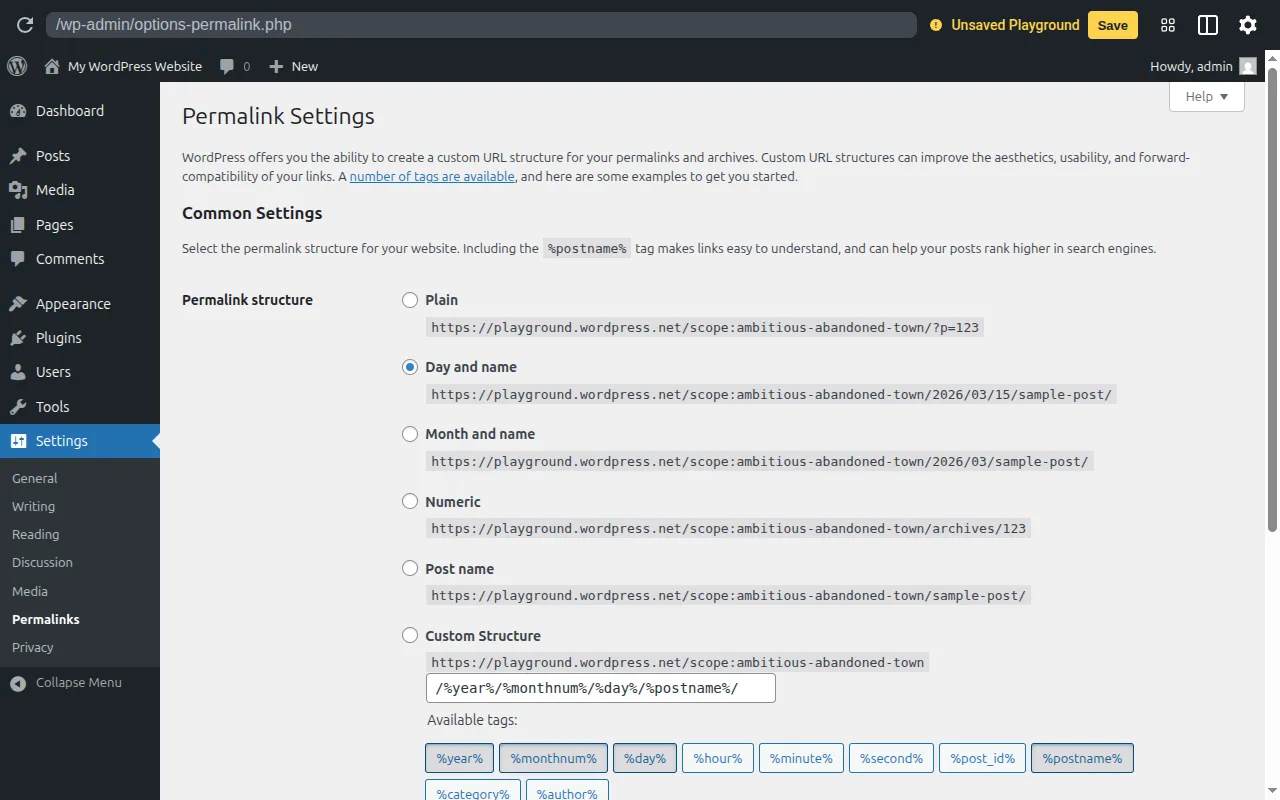
You set your permalink structure from Settings → Permalinks in your dashboard. WordPress gives you six preset options:
- Plain (
?p=123) - Day and name (
/2026/03/17/sample-post/) - Month and name (
/2026/03/sample-post/) - Numeric (
/archives/123) - Post name (
/sample-post/) — recommended - Custom Structure (build your own with tags like
%category%,%author%,%year%)
Important: Set your permalink structure before you start publishing content. Changing permalinks later breaks all existing URLs (unless you set up 301 redirects). This is one of the first things to configure on a new WordPress site.
Each post and page also has an editable slug — the part of the permalink you can customize. WordPress generates the slug automatically from your title, but you can shorten or change it.
Why It Matters
Clean permalinks are critical for SEO. Search engines prefer short, descriptive URLs with keywords. A URL like /best-wordpress-plugins/ tells Google exactly what the page is about, while /?p=42 tells it nothing. Set this up on day one — it's in our SEO checklist and beginner's guide for a reason.
Sources: WordPress.org: Customize Permalinks, WordPress.org: Permalinks Settings