
Dashboard
Quick Definition
The WordPress Dashboard is the first screen you see after logging in. It's your site's control center — showing a summary of your content, recent activity, and quick links to every admin feature.
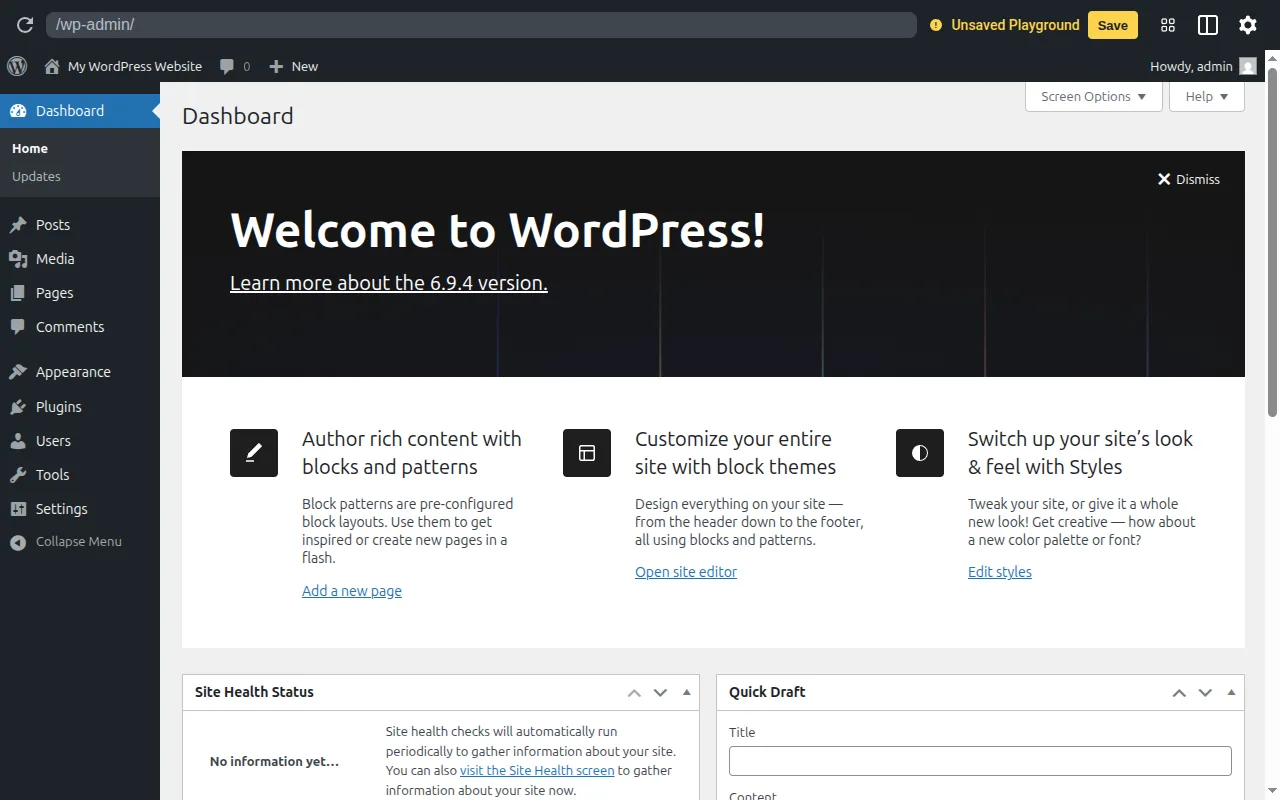
What Is the Dashboard?
The WordPress Dashboard is the main administration screen you see after logging into your site at yoursite.com/wp-admin. According to the official WordPress documentation, it presents information in blocks called widgets and provides quick access to all administrative areas of your site.
By default, WordPress displays five dashboard widgets:
- At a Glance — shows your total number of posts, pages, and comments, plus your WordPress version and active theme
- Activity — lists recently published posts and the latest comments awaiting moderation
- Quick Draft — lets you write and save a new draft post without leaving the dashboard
- WordPress Events and News — shows upcoming local WordPress events and news from the official WordPress blog
- Welcome — appears on new installations with links to common setup tasks
The Dashboard in Practice
The dashboard is just the home screen. The real power is in the admin sidebar menu on the left, which gives you access to everything:
- Posts — write and manage blog posts
- Pages — create static pages (About, Contact, etc.)
- Appearance — manage your theme and widgets
- Plugins — install and manage plugins
- Settings — configure site title, permalinks, reading options, and more
You can customize which dashboard widgets appear using the Screen Options tab at the top right. Drag and drop widgets to rearrange them. Many plugins add their own dashboard widgets too — for example, Yoast SEO adds an SEO overview widget.
Why It Matters
The dashboard is where you'll spend most of your time managing WordPress. Getting familiar with it is the first step to becoming comfortable with the platform. We've written a complete walkthrough in our WordPress Dashboard Explained guide, and our beginner's guide covers the full setup process.
Sources: WordPress.org: Dashboard Screen, WordPress.org: Administration Screens