
Fluent Forms Review: Is It Worth It? (2026)
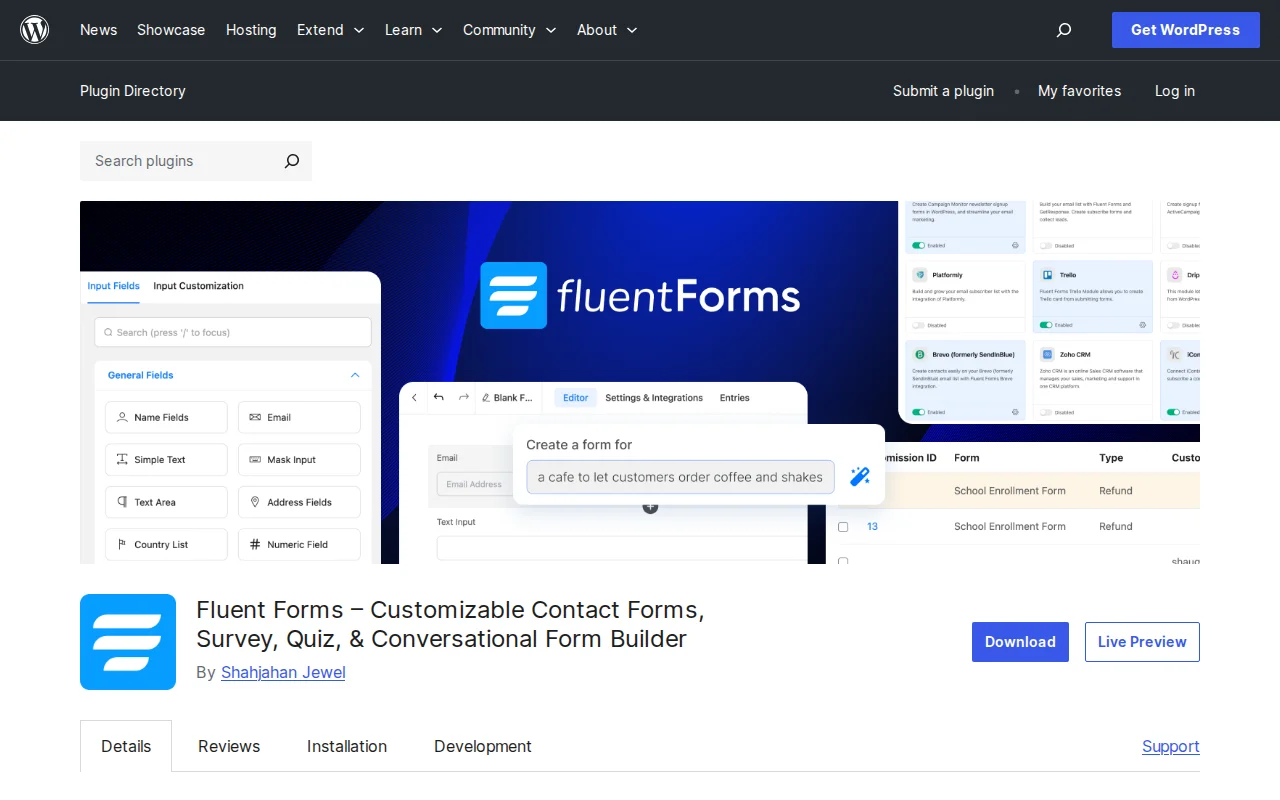
What Is Fluent Forms?
Fluent Forms is a lightweight drag-and-drop form builder for WordPress that packs an impressive amount of features into a tiny footprint — under 30KB of combined CSS and JS, compared to 300KB+ for most competitors. With 15.4 million downloads, a 4.8/5 star rating from 743 reviews, and 300,000+ active businesses, it has rapidly become one of the top form plugins on WordPress.org.
Key Features
- Drag-and-Drop Builder — Visual form editor with 25+ field types (free) or 55+ (Pro), multi-column layouts up to 6 columns, and conditional logic
- Conversational Forms — One-question-at-a-time format for higher completion rates — included free, not a paid add-on
- AI Form Builder — Describe what you need and the AI generates a complete form for you
- Payment Processing — Stripe integration included in the free version (1.9% transaction fee). Pro adds PayPal, Razorpay, Square, Mollie, and subscriptions
- Quiz and Survey Module — Built-in scoring, grading, and survey analytics (Pro)
- 40+ Integrations — Mailchimp, HubSpot, Zapier, Slack, FluentCRM, ConvertKit, ActiveCampaign, and more
- One-Click Migration — Import forms from WPForms, Contact Form 7, Gravity Forms, Ninja Forms, and Caldera Forms
Free vs Premium
The free version is remarkably generous: drag-and-drop builder, conditional logic, conversational forms, Stripe payments, spam protection (reCAPTCHA, hCaptcha, Turnstile), email notifications, form scheduling, data export, and analytics. Most simple contact forms never need Pro.
Fluent Forms Pro adds power-user features:
- Single Site ($79/year) — 55+ fields, multi-step forms, advanced styler, quiz module, user registration, post creation from submissions, all payment gateways, all integrations
- Agency ($199/year, 5 sites) — Same features, more sites
- Unlimited ($399/year) — Unlimited sites
Lifetime plans are available: $279 (single), $479 (agency), $799 (unlimited). This is significant — most form plugins do not offer lifetime pricing.
Pros and Cons
Pros
- Fastest form plugin — under 30KB footprint vs 300KB+ for WPForms and Gravity Forms
- Conversational forms and Stripe payments included free — competitors charge for these
- AI form builder generates forms from natural language descriptions
- Lifetime pricing available — pay once, use forever
- One-click migration from competing form plugins
- Active development — v6.1.21, updated March 2026
Cons
- Newer than WPForms and Gravity Forms — smaller community and fewer third-party tutorials
- Free Stripe payments include a 1.9% transaction fee (removed with Pro)
- Advanced styling requires Pro — free version uses basic default styles
- Some users report the settings panel can feel overwhelming with so many options
- Quiz and survey features require Pro
Who Should Use Fluent Forms?
Fluent Forms is the best choice if performance matters to you — it is objectively the lightest form plugin available. If you need conversational forms or payment processing without paying for premium, no other plugin matches its free tier. It is also excellent for agencies who want lifetime pricing instead of annual renewals. If you prioritize an enormous third-party ecosystem and community, WPForms or Gravity Forms may still have an edge — but Fluent Forms is closing that gap fast.
Best Alternatives
- WPForms — The most popular form plugin (6M+ installs). Easier for beginners with a simpler interface, but heavier and less generous free version. Pro from $49.50/year. Read our contact form plugins guide
- Gravity Forms — The original premium form plugin. More mature with extensive add-ons, but no free version — starts at $59/year. See our comparison
- Contact Form 7 — Completely free and lightweight, but no visual builder — you configure forms with shortcodes and HTML. Read our guide
Frequently Asked Questions
Is Fluent Forms free?
Yes, the free version includes the drag-and-drop builder, 25+ fields, conditional logic, conversational forms, Stripe payments (with 1.9% fee), spam protection, and email notifications. Pro ($79/year or $279 lifetime) adds 55+ fields, all payment gateways, quizzes, and advanced styling.
How does it compare to WPForms?
Fluent Forms is faster (30KB vs 300KB+), offers more in the free version (conversational forms, Stripe payments), and has lifetime pricing. WPForms has a larger user base, more templates, and a simpler interface for absolute beginners.
Can I accept payments with the free version?
Yes. Fluent Forms 6.0+ includes Stripe payment fields in the free version with a 1.9% transaction fee per payment. Upgrading to Pro removes the fee and adds PayPal, Razorpay, Square, and subscription support.
Can I migrate from another form plugin?
Yes. Fluent Forms includes one-click migration from WPForms, Contact Form 7, Gravity Forms, Ninja Forms, and Caldera Forms — including form structure and settings.
Will Fluent Forms slow down my site?
No. Fluent Forms loads under 30KB of combined CSS and JavaScript per form — significantly less than any competitor. It is the lightest form plugin available for WordPress.

Written by Marvin
Our team tests and reviews WordPress products to help beginners make confident choices.
Learn more about our team →You might also like
WooCommerce Stripe Review: Is It Worth It? (2026)
Honest review of the WooCommerce Stripe Payment Gateway — 23+ payment methods, Apple Pay, Google Pay, Klarna, and fraud protection. Free plugin, pay-per-transaction.
postFlamingo Review: Is It Worth It? (2026)
Honest review of Flamingo — the companion plugin for Contact Form 7 that stores form submissions in your WordPress database.
postWooCommerce PayPal Payments Review: Is It Worth It? (2026)
Honest review of WooCommerce PayPal Payments — the official PayPal plugin for WooCommerce. PayPal, Venmo, Apple Pay, Google Pay, and card processing in one plugin.
postSlider Revolution Review: Is It Worth It? (2026)
Honest review of Slider Revolution — the premium WordPress slider and visual effects plugin powering 9 million sites. Hero sections, carousels, and animations.