
Click to Chat Review: Is It Worth It? (2026)
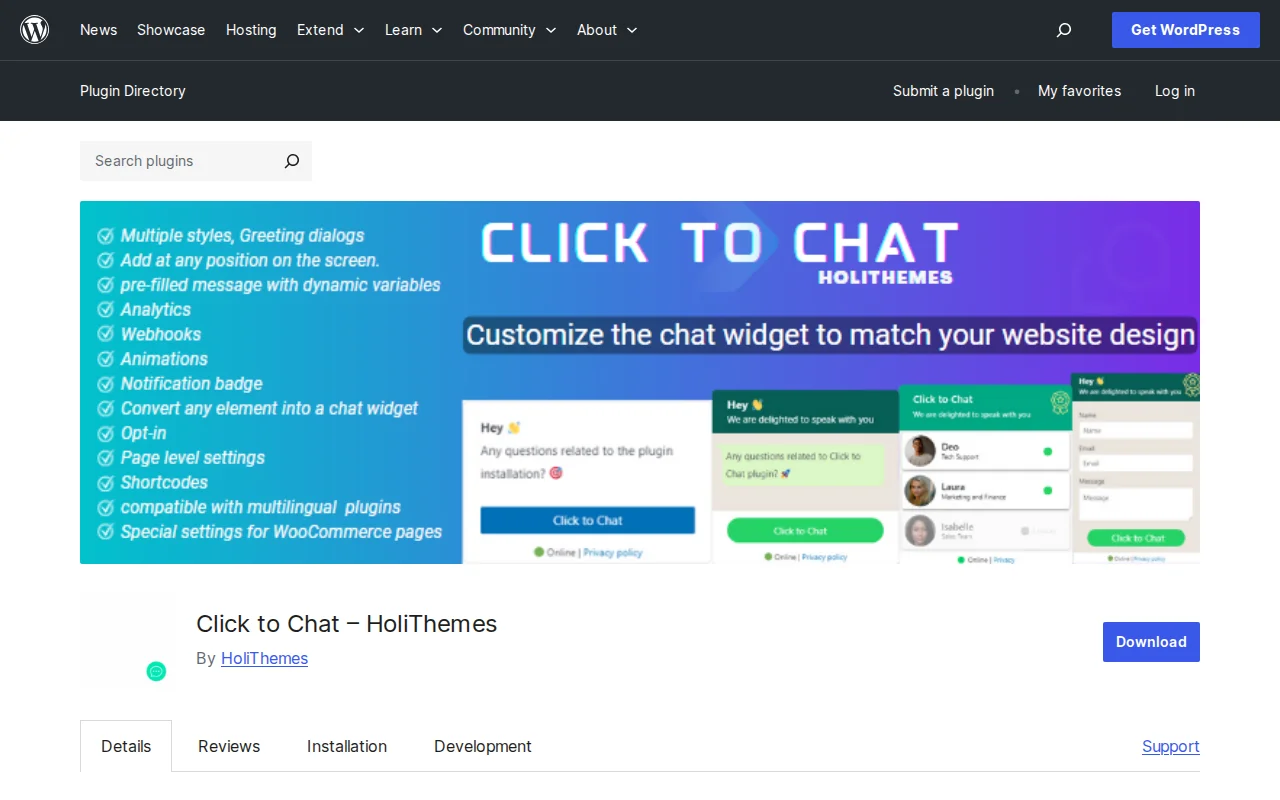
What Is Click to Chat?
Click to Chat by HoliThemes is a WordPress plugin that adds a WhatsApp chat button to your site so visitors can message you with one tap. With 19.4 million downloads and a 4.8/5 star rating from 132 reviews, it is one of the most popular WhatsApp plugins on WordPress.org. Setup takes less than a minute — enter your number, pick a style, and you are live.
Key Features
- 8 Pre-Defined Button Styles — Choose from built-in designs or use a custom image, animated image, or GIF as your chat button
- Pre-Filled Messages — Use dynamic variables (
{site},{title},{url},{product},{price}) so visitors send contextual messages automatically - Greeting Dialogs — Show a customizable popup before the visitor opens WhatsApp, with branding, custom text, and multiple layouts
- WooCommerce Integration — Override settings per product page, add WhatsApp buttons near "Add to Cart," and include product name/price/SKU in messages
- Analytics Tracking — Built-in events for Google Analytics, Meta Pixel, Google Ads conversions, and webhooks (Zapier, IFTTT)
- Display Rules — Show or hide the button based on post type, category, device type, or specific pages
- Group Chat and Share — Let visitors join a WhatsApp group or share your page via WhatsApp
Free vs Premium
The free version is remarkably complete: 8 button styles, pre-filled messages with dynamic variables, greeting dialogs, WooCommerce integration, analytics tracking, display rules, page-level overrides, and WPML/Polylang support. Most sites will never need Pro.
Click to Chat Pro adds features for businesses with teams:
- Single ($18/year, 1 site) — Multi-agent with availability hours, form collection before chat, business hours with online/offline modes, random agent routing, webhooks with UTM tracking
- Plus ($34/year, multiple sites) — Same features, more sites
- Unlimited ($16/year) — All features, unlimited sites
At $16–$18/year, this is one of the cheapest Pro upgrades in the entire WordPress ecosystem. The 14-day money-back guarantee makes it risk-free.
Pros and Cons
Pros
- 4.8/5 stars — excellent user satisfaction across 19M+ downloads
- Setup takes under 1 minute — enter number, pick style, done
- Generous free version with analytics, WooCommerce, and display rules included
- Pro is incredibly affordable ($18/year) compared to competitors
- Lightweight with minimal performance impact
- Supports both WhatsApp and WhatsApp Business
Cons
- Fewer greeting dialog designs than Joinchat
- Some users report the button occasionally opening WhatsApp Web instead of the mobile app on smartphones
- No built-in AI chatbot or automated replies (even in Pro)
- Multi-agent and form features require Pro
- Interface is functional but not the most polished
Who Should Use Click to Chat?
Click to Chat is perfect if you want a simple, fast WhatsApp button without the complexity of a full chat platform. It is especially good for small businesses, freelancers, and WooCommerce stores in markets where WhatsApp is the primary messaging app. If you need chatbot flows and AI replies, Joinchat is the better choice. If you just want a clean WhatsApp button that works, Click to Chat is hard to beat — especially at $18/year for Pro.
Best Alternatives
- Joinchat — More feature-rich with chatbot flows, AI replies, and a Gutenberg block. Higher price (€49/year) but more marketing-oriented features. Read our Joinchat review
- Social Chat — Another WhatsApp button plugin by developer Suspended. Simpler but less actively maintained.
- Tidio — Full live chat platform with WhatsApp, Messenger, email, and AI. Much more powerful but much heavier and starts at $29/month.
Frequently Asked Questions
Is Click to Chat free?
Yes, the free version includes 8 button styles, pre-filled messages, greeting dialogs, WooCommerce integration, analytics tracking, and display rules. Pro adds multi-agent, form collection, and business hours for just $18/year.
How is Click to Chat different from Joinchat?
Both add WhatsApp buttons to WordPress. Click to Chat is simpler, lighter, and cheaper ($18/year vs €49/year). Joinchat has more advanced features like chatbot conversation flows, AI replies, and richer greeting dialogs. Choose based on whether you need simplicity or marketing automation.
Does it work with WooCommerce?
Yes. You can override WhatsApp settings per product, add the button near "Add to Cart," and automatically include product name, price, and SKU in the pre-filled WhatsApp message.
Can I track WhatsApp clicks in Google Analytics?
Yes. Click to Chat fires events automatically for Google Analytics 4, Meta Pixel, Google Ads, and custom webhooks — no extra setup required.
Can I add multiple WhatsApp agents?
Multi-agent support with individual availability hours and random routing is a Pro feature ($18/year). The free version supports one WhatsApp number.

Written by Marvin
Our team tests and reviews WordPress products to help beginners make confident choices.
Learn more about our team →You might also like
Joinchat Review: Is It Worth It? (2026)
Honest review of Joinchat — the most popular WhatsApp chat plugin for WordPress. Floating button, chatbot flows, WooCommerce integration, and analytics tracking.
postSlider Revolution Review: Is It Worth It? (2026)
Honest review of Slider Revolution — the premium WordPress slider and visual effects plugin powering 9 million sites. Hero sections, carousels, and animations.
postWPBakery Page Builder Review: Is It Worth It? (2026)
Honest review of WPBakery Page Builder — the legacy WordPress page builder powering 5.8 million sites. Dual editors, 200+ addons, and a one-time license. But is it still worth choosing in 2026?
postHello Dolly: The Story Behind WordPress's Most Famous Plugin
Hello Dolly ships with every WordPress installation. It displays random lyrics from the Louis Armstrong song. Here is why it exists and whether you should keep it.