
Best WordPress AI Chatbot Plugins in 2026 — 5 Options Compared
Most site owners do not need an "AI chatbot" just because the term sounds modern. They need one for a specific job: answering support questions, qualifying leads, recommending products, or letting visitors search site knowledge without waiting for a human. If you start there, the category makes much more sense.
The problem is that the WordPress AI chatbot plugin landscape is messy. Some tools are truly WordPress-native. Some are basically SaaS products with a WordPress connector. Some are glorified live chat widgets with a little AI sprinkled on top. And some are genuinely powerful, but too complex for the average site owner to use well.
So I filtered this list down to the WordPress AI chatbot plugins that actually make sense in 2026 and checked the current details against official plugin pages and product sites on April 10, 2026. If you want something more site-connected than a public chat widget, also read my guide to the WordPress Claude AI MCP connector, the full MCP setup guide for AI agents, and my WordPress MCP guide. For a wider comparison of AI tooling inside WordPress, also see my best AI plugins for WordPress in 2026 roundup.
Quick Comparison Table
| Plugin | Best For | Active Installs | Pricing Signal | What It Does Best |
|---|---|---|---|---|
| AI Engine | Best overall for WordPress-native AI | 100,000+ | Free + Pro from $59/yr | Content-trained chatbots, model flexibility, MCP angle |
| Tidio | Best for support and sales teams | 80,000+ | Free plan + paid AI tiers | Customer support automation and polished inbox workflows |
| Chatway | Best for simple support/helpdesk setup | 30,000+ | Free + paid upgrades | Fast AI support agent setup with human oversight |
| WPBot | Best native lead generation chatbot | 6,000+ | Free + Pro from $39/yr | Lead capture, native WordPress control, multiple AI backends |
| Smartsupp | Best for WooCommerce product assistance | 20,000+ | From $17/mo + AI add-on | Shopping-assistant style chatbot for ecommerce |
My recommendation: If you want the strongest all-round WordPress-native option, use AI Engine. If your primary goal is customer support automation with a polished commercial workflow, use Tidio. If your site is more lead-gen focused and you want a native WordPress chatbot that can work with different AI services, WPBot is the most interesting specialist.
What Counts as a Real WordPress AI Chatbot Plugin?
For this roundup, I counted a plugin as relevant if it met at least one of these tests:
- It lets you deploy an AI-trained chatbot directly on a WordPress site.
- It uses your site content, knowledge base, or docs to answer questions.
- It materially helps with support, lead generation, or product recommendation through AI chat.
I did not reward plugins just for having a normal live chat box or a generic “chatbot” label. The point of an AI chatbot plugin is not to look interactive. It is to reduce support load, improve response speed, and create useful interactions that feel connected to your site.
1. AI Engine — Best WordPress AI Chatbot Plugin Overall
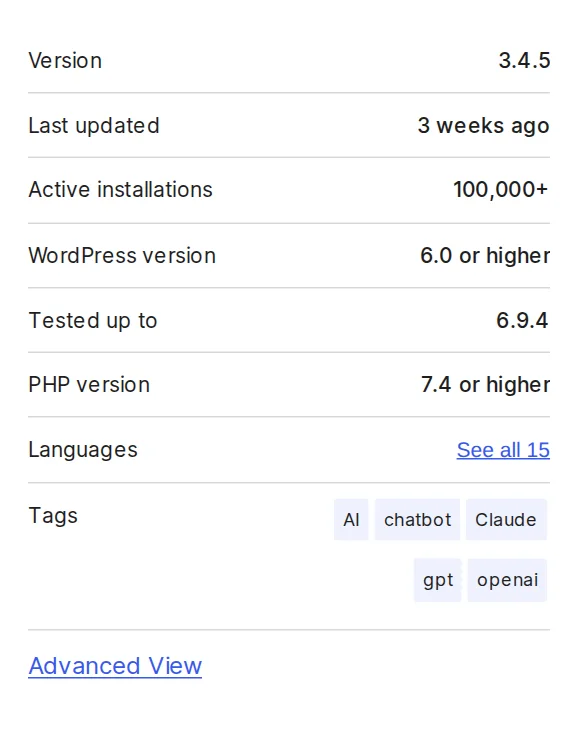
AI Engine is the most interesting plugin in this category if you actually care about WordPress as a platform rather than just dropping a third-party chat bubble onto your site. The official WordPress.org listing currently shows 100,000+ active installations, version 3.4.5, and testing up to WordPress 6.9.4. That alone already puts it in serious-company territory.
What I like about AI Engine is that it is not pretending the chatbot is the whole product. The plugin is clearly built around connecting WordPress to modern AI models and workflows. Chatbots are one major module, but so are AI forms, model integrations, content tools, embeddings, and MCP support. That matters because it gives you more room to grow. If today you want a chatbot and six months from now you want AI-powered site workflows, AI Engine can stretch with you.
The official Meow Apps pricing page currently shows AI Engine Pro Starter at $59/year for one site. That feels reasonable given the breadth of the plugin, especially if you are building on top of it rather than just treating it like a basic support widget.
Best for: WordPress power users, site builders, agencies, AI experimenters, and anyone who wants a chatbot that sits inside a wider WordPress AI stack.
What I like: strong native WordPress fit, multi-model flexibility, and a much richer roadmap than just “chat on the front end.” What I do not like: for a simple support chatbot, it can be more plugin than many people really need.
Verdict: Best overall WordPress AI chatbot plugin if you want capability, not just convenience.
Official sources: AI Engine on WordPress.org, AI Engine Pro pricing
2. Tidio — Best for Customer Support and Sales Automation
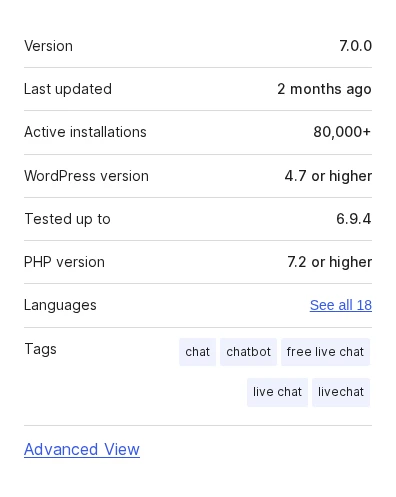
Tidio is a very different type of AI chatbot plugin. It is less about expanding WordPress itself and more about plugging a polished customer communication platform into your site. The official WordPress.org plugin page currently shows 80,000+ active installations, version 7.0.0, and testing up to WordPress 6.9.4. That is a healthy install base for a commercial support-focused tool.
Its AI layer, Lyro, is positioned around support automation, and Tidio’s official product materials say it can automate around 67% of customer inquiries on average. The plugin description itself goes even further and references automating up to 70% of inquiries. The bigger point is not the exact percentage. It is that Tidio is built around support workflow maturity: live chat, inboxing, automation, escalation, and conversion-oriented conversation handling.
Tidio’s official AI agent product schema currently lists a Free plan alongside paid tiers starting higher up the stack, while the platform keeps offering free AI trial access and broader commercial plans. In practice, this is a “try free, then graduate into paid support automation” product.
Best for: businesses that want AI to handle support and pre-sales chats, not just answer trivia from a content site.
What I like: polished support workflow, strong commercial maturity, and a much clearer business case than many WordPress-native AI toys. What I do not like: less WordPress-native depth than AI Engine, and more of the real value lives in Tidio’s own platform than in WordPress itself.
Verdict: Best choice if your WordPress site is part of a real support or sales operation.
Official sources: Tidio on WordPress.org, Tidio Lyro AI agent, Tidio pricing
3. Chatway — Best Simple AI Support Chatbot for WordPress
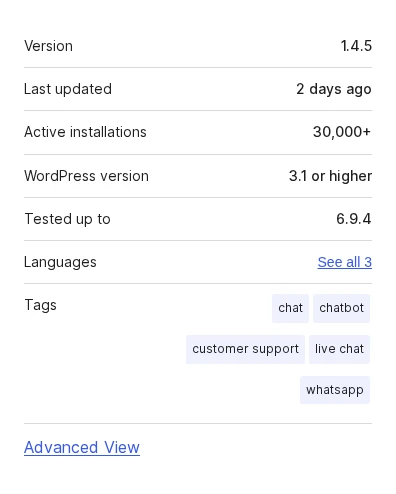
Chatway is the option I would look at if the job is straightforward: add an AI support agent, keep a human in the loop, and get moving without building a mini AI stack. The official WordPress.org page currently shows 30,000+ active installations, version 1.4.5, and testing up to WordPress 6.9.4. It also has one of the freshest update cadences in this shortlist, with the current version updated 2 days ago.
Its product messaging is direct and practical. Chatway is about support, FAQ, live chat, helpdesk behavior, and monitored AI assistance. That makes it easier to recommend to normal businesses that want something more focused than AI Engine and less enterprise-styled than a larger platform rollout. The official pricing page is intentionally framed around starting free and upgrading as you grow, which matches that positioning.
Best for: service businesses, support teams, and site owners who want an AI support bot with simple human oversight and less implementation overhead.
What I like: clear use case, healthy plugin adoption, and a cleaner practical story than many AI-branded plugins with vague ambitions. What I do not like: less expansive than AI Engine and less proven at larger scale than Tidio.
Verdict: Best simple support-focused AI chatbot plugin for WordPress.
Official sources: Chatway on WordPress.org, Chatway pricing
4. WPBot — Best Native AI Chatbot for Lead Generation
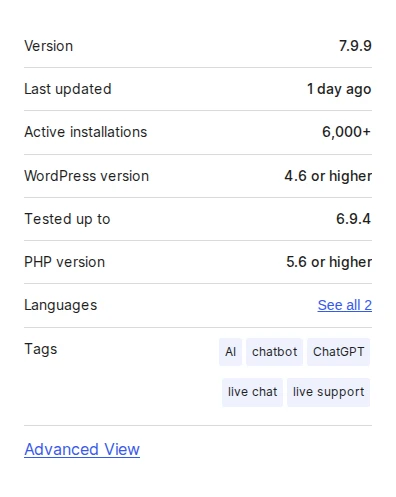
WPBot is not the biggest plugin here, but it deserves a place in this roundup because it has a very specific native-WordPress appeal. The official WordPress.org listing currently shows 6,000+ active installations, version 7.9.9, and testing up to WordPress 6.9.4. It was also updated just 1 day ago, which matters in a fast-moving category like this.
The plugin positions itself around live support, lead generation, and AI services, and that framing is important. WPBot is not just trying to answer questions. It is trying to help site owners capture information, handle conversational forms, and work with multiple AI backends like OpenAI, Gemini, OpenRouter, and Dialogflow. That makes it particularly relevant for lead-gen-heavy WordPress sites where the chatbot is not just a support tool but also a conversion tool.
The official pricing page currently surfaces a Starter plan at $39/year, with higher annual and lifetime tiers available. That puts WPBot in a commercially accessible spot for a site owner who wants more native control without jumping into a bigger support SaaS.
Best for: marketers, lead-gen sites, agencies, and WordPress users who want more native control over chatbot behavior and data capture.
What I like: clear lead-generation angle, native WordPress feel, and flexibility around AI providers. What I do not like: smaller install base than the top two and a broader feature story that can feel busier than simpler tools.
Verdict: Best WordPress-native AI chatbot if leads matter as much as support.
Official sources: WPBot on WordPress.org, WPBot pricing
5. Smartsupp — Best for WooCommerce Product Assistance
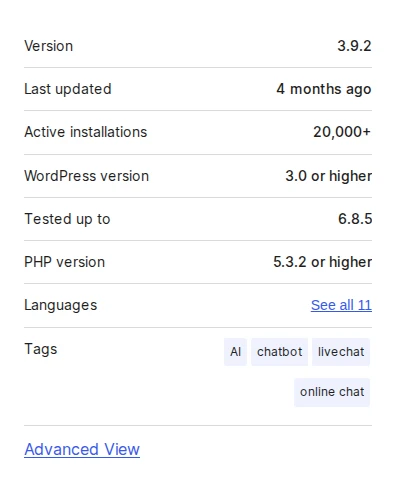
Smartsupp is the most ecommerce-leaning option in this list. The official WordPress.org plugin page currently shows 20,000+ active installations, version 3.9.2, and testing up to WordPress 6.8.5. On top of that, the plugin’s own WordPress.org description says the broader Smartsupp platform is trusted by 100,000+ online stores, which gives useful context for where it is strongest.
Its AI story is not generic support. It is shopping assistance: helping answer product questions, recommending products, and turning conversations into conversions. The official pricing page currently shows a Solo plan from $17/month billed annually, with AI agent functionality presented as an additional capability in the stack. That makes Smartsupp especially relevant for WooCommerce sites that want an AI shopping assistant, not just a FAQ bot.
Best for: WooCommerce stores and product-heavy sites that want conversational selling and product guidance.
What I like: clear ecommerce angle, practical conversion use case, and stronger shopping-assistant positioning than most generic chat plugins. What I do not like: less WordPress-native than AI Engine or WPBot, and a bit less current on WordPress compatibility than the strongest up-to-date plugins in this list.
Verdict: Best WooCommerce-oriented AI chatbot plugin in this roundup.
Official sources: Smartsupp on WordPress.org, Smartsupp pricing
How to Choose the Right Plugin
If you want a shortcut, use this:
- Choose AI Engine if you want the best all-round WordPress-native AI chatbot with room to expand into broader AI workflows.
- Choose Tidio if support automation and sales conversations are the real business problem.
- Choose Chatway if you want a simpler AI support bot with a practical helpdesk feel.
- Choose WPBot if lead generation and native WordPress control matter most.
- Choose Smartsupp if your site is a store and you want AI product assistance.
If your use case still sounds vague after that, do not install an AI chatbot yet. This category works best when the job is concrete: reduce support load, capture leads, or guide buying decisions.
Frequently Asked Questions
What is the best WordPress AI chatbot plugin overall?
For most WordPress-first use cases, AI Engine is the best overall option because it is the strongest mix of native fit, flexibility, and long-term usefulness. For support-heavy business sites, Tidio is the stronger commercial operator.
Which WordPress AI chatbot plugin is best for WooCommerce?
Smartsupp is the best ecommerce-focused option in this list because it is explicitly built around product conversations and shopping assistance. If you want broader support automation across channels, Tidio is the other serious contender.
Can these plugins answer questions from my own site content?
Yes, but not all of them do it the same way. AI Engine, Chatway, and ChatBot-style tools are more explicit about training on site content or data sources. Tidio and Smartsupp lean more into support and conversion workflows around knowledge sources and automation.
Are WordPress AI chatbot plugins worth it?
They are worth it when the chatbot replaces repetitive support work, captures leads, or helps visitors move toward a conversion. They are not worth it if the site does not have enough traffic or enough repeated questions for the chatbot to justify its cost and maintenance.
Primary Sources Used
To keep this roundup grounded in current product data, I checked these official sources on April 10, 2026:
- AI Engine on WordPress.org
- AI Engine Pro pricing
- Tidio on WordPress.org
- Tidio Lyro AI agent
- Tidio pricing
- Chatway on WordPress.org
- Chatway pricing
- WPBot on WordPress.org
- WPBot pricing
- Smartsupp on WordPress.org
- Smartsupp pricing
Final Recommendation
If I were choosing today for a typical WordPress site, I would start with AI Engine because it gives the strongest native fit and the most upside beyond just a chatbot widget. If I were running a support-heavy business site, I would look first at Tidio. And if the site lived or died by lead capture, WPBot would be the most interesting specialist in the group.
The right pick depends less on the AI label and more on the job you need the chatbot to do once it is live.

Written by Marvin
Our team tests and reviews WordPress products to help beginners make confident choices.
Learn more about our team →You might also like
WooPayments Review: WooCommerce's Built-In Payment Plugin
WooPayments lets you accept credit cards, Apple Pay, Google Pay, and more directly from your WordPress dashboard — no separate Stripe account needed. Here's what it does well, where it falls short, and when you should use the direct Stripe plugin instead.
postAutoptimize Review: Free Speed Plugin That Actually Works
Autoptimize minifies and combines your CSS, JavaScript, and HTML to make your WordPress site load faster. I cover what it does, how it compares to WP Rocket and LiteSpeed Cache, and whether the free version is enough.
postFile Manager Plugin Review: Convenient but Handle With Care
WP File Manager puts FTP-style file access right in your WordPress dashboard. I explain what it does, who should use it, and why you need to be careful about security before installing it.
postBest WordPress Monetization Plugins to Earn From Your Site
There are dozens of ways to make money with WordPress, but you need the right tools. I cover 6 monetization plugins I actually use and trust — for affiliate links, ads, digital products, and payments.